Changelog
Changelog - 18 July 2026
Happy weekend!
Thank you for the great feedback I received over the past week. From emails, to video recordings, calls and even featured in a Blog post, I'm so inspired to have this amount of interest in PixelGlass and I'm working around the clock to make it the best theme builder for Ghost Publishers out there.
Here's a summary of the changes over the past week.
New frontier model added
PixelGlass is now much smarter and token efficient. It has much better knowledge on Ghost and design than before and is even more optimised to make your credits go further.
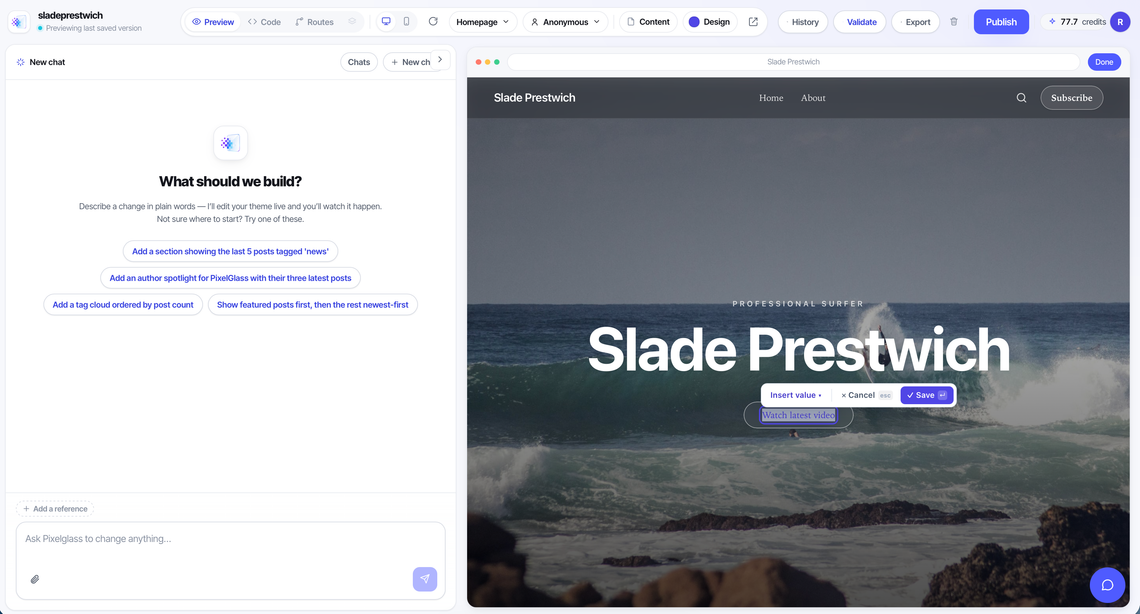
Edit mode: point at it, change it
The editor now has a WYSWYG (What you see what you get) Edit Mode.
Flip it on and your theme becomes something you shape by hand:
- Point-and-prompt. Click any section and tell the AI what to change about exactly that spot — no more describing where things are.
- Move sections instantly. You can now move sections up and down.
- Duplicate and delete sections. Two clicks from the section tab. No prompt needed.
- Edit text right in the preview. Click into a headline or paragraph and just type, and an insert palette for adding new elements from Ghost.
- Your Ghost content is protected. Text that comes from your actual posts and settings (titles, excerpts, site name) can't be overwritten by accident.
The preview runs Ghost's real apps
What you see in the preview is now much closer to what your readers get:
- Portal, Search, and Comments render live inside the preview — the same apps a real Ghost site runs, wired up automatically when memberships are on.
- Preview as a member. Switch between Anonymous, Free, and Paid viewers to see exactly what each audience sees, one-to-one with Ghost.
- Live accent color. Change your accent in the Design panel and Portal and Comments recolour on the spot, just like real Ghost.
- Comments now follow your theme's dark and light modes correctly.
Smarter conversations
- Multiple chat sessions per theme. Start a fresh conversation without losing the old one.
- Restore. Every reply in the chat now carries a Restore button — roll your theme back to that exact moment. Also a feedback option that sends us the context we need to actually help should the AI not have responded what it intended.
- The AI now keeps track of what it has already done, so it won't accidentally re-apply an old request you've since moved past.
Fixes and polish
- The preview's page dropdown follows you as you click around inside the theme, and Edit mode no longer jumps you back to the homepage.
- History stays fresh after section moves.
🏁
Try it out now, login to your account on PixelGlass and give it a spin.